Your dog barks, you get a photo on Telegram. Runs on the
Seeed XIAO ESP32S3 Sense (~$20): hears a bark, snaps a photo with the
onboard camera, sends it to your phone. No cloud, no AI — just signal
processing on the board.
1. Flash it (in your browser, no install)
Plug the board into USB, then click. Works in Chrome and Edge
(desktop or Android) — the board resets itself, no button pressing.
2. Set it up (one time, ~2 minutes)
Power the board (USB). For 10 minutes it broadcasts an open WiFi network
barkcam-config — connect your phone to it.
Open barkcam.local in your phone's browser (or
192.168.4.1 if that doesn't resolve).
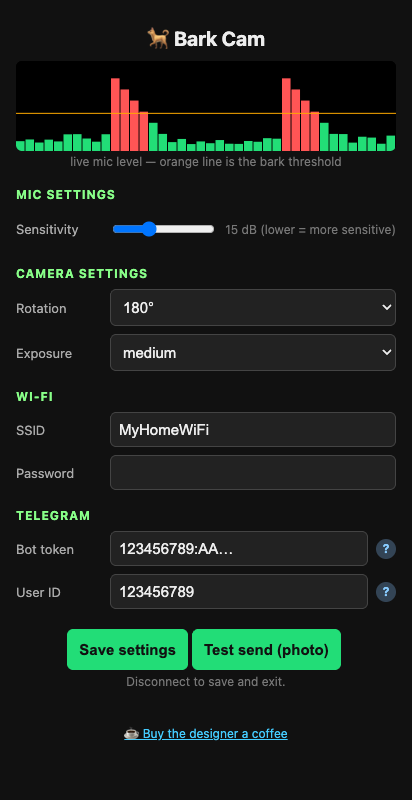
Enter your home WiFi, a Telegram bot token (from @BotFather) and your
user ID (from @userinfobot). Hit Save settings. Done — the board
closes its access point when your phone disconnects.
Other ways to get it
Download the firmware and flash
with esptool: esptool.py --chip esp32s3 write_flash 0x0 barkcam-v1.bin